
How On-chain Storage works
What On-chain Storage is
On-chain Storage keeps the file directly inside your personal canister. There is no external storage service for the bytes: the canister keeps the file itself, the file record, and access rules.
This mode is simpler to reason about, but it costs more. Every stored byte lives in canister memory and is paid for with cycles, so On-chain Storage is a better fit for small, high-value files.
You remove the external storage layer. In exchange, cost is higher, and cycle balance becomes part of normal storage operations.
Where the file lives
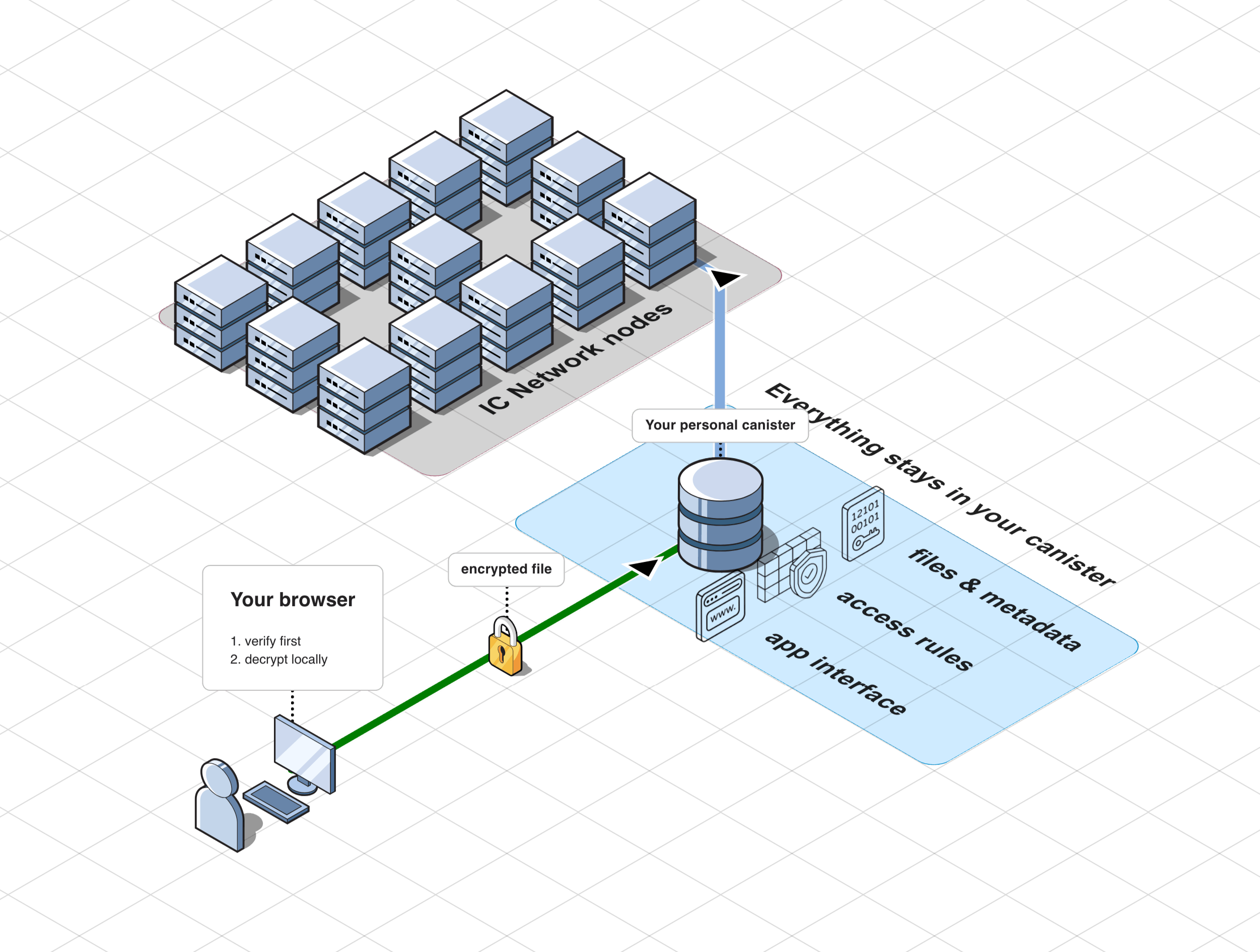
The On-chain Storage path is shorter:
- your browser prepares and uploads the file directly to the canister;
- your personal canister keeps the file, trusted record, and access state;
- there is no external gateway or external object storage layer in the file path.
How upload works
Before upload, the canister checks that it can safely accept the file: you have write access, the declared size fits the storage, and the cycle balance is enough for the operation.
Prepare the file in the browser
The browser encrypts the file locally and splits it into chunks, so upload does not require one large request.
Send chunks to the canister
The canister accepts file chunks one by one and keeps the upload within the allowed size and available cycles.
Store the file and trusted record
After all chunks are transferred, the canister stores the file and records the data your browser uses for later verification.
When cycles are low
In On-chain Storage, cycle balance quickly becomes a practical constraint: the file lives inside canister memory, and writing bytes also costs cycles. If the safe balance is not enough during upload, two outcomes are possible.
- Active Pro is enabled: Rabbithole can request an automatic cycle top-up. The interface shows Waiting for cycles..., and the upload waits for funding.
- Active Pro is not enabled: the owner must top up the canister manually. After top-up, a compatible retry can continue the upload.
This is not an ownership error and does not mean the file is lost. The canister is refusing to start work it cannot safely finish.
How download works
Request file chunks from the canister
The browser asks your canister for file data. There is no external file gateway in the file path.
Verify and open locally
The browser checks integrity and decrypts the file on your device.
Why it costs more
On-chain Storage costs more because every stored byte lives inside canister memory and affects the canister's operating balance.
- The network maintains file bytes over time.
- Stable memory and computation are paid from the canister's cycle balance.
- Large files require a larger safe floor and may trigger funding checks more often.
Practical limits
On-chain Storage makes sense when:
- files are relatively small;
- the number of files is limited;
- simpler architecture matters more than cost efficiency;
- you are ready to monitor cycles or use active Pro.
For large media collections or cost-sensitive bulk storage, it is usually a poor fit.
Why the trust model is simpler
With On-chain Storage, there is no external file gateway and no external object storage layer holding the file. That makes the storage path easier to reason about:
- your browser prepares the file;
- your canister stores the file;
- your browser verifies and opens it again.
Technical details
Upload session
On-chain Storage does not write a large file directly into its final state. Upload runs through a session: the canister creates a temporary record, reserves the declared size, accepts file chunks, and only then moves data into the final file version.
If cycles are low, the session waits for funding. A compatible retry can continue the existing session, so upload does not have to start from zero. If the upload cannot continue, the client tries to abort the session and release temporary resources.