
How Blob Storage works
What Blob Storage is
Blob Storage is the recommended mode for most encrypted files. The bytes live outside your canister, while the canister keeps the file record, access rules, and the data your browser uses to detect replacement.
By default the bytes are held by Caffeine Blob Storage — an external service that keeps them on S3-compatible storage and handles paying for the space and keeping the stored data in order. With Pro you can connect your own S3 bucket instead and pay your provider directly; the flow is the same either way.
The storage layer sees only ciphertext. Blob Storage handles byte storage and delivery, while browser-side encryption protects file confidentiality before upload.
You pay less and handle large files more comfortably. In exchange, long-term byte availability depends on the Blob Storage lifecycle.
The external storage layer keeps the file itself. Your personal canister keeps the trusted file record, access rules, and verification data.
Where the file lives
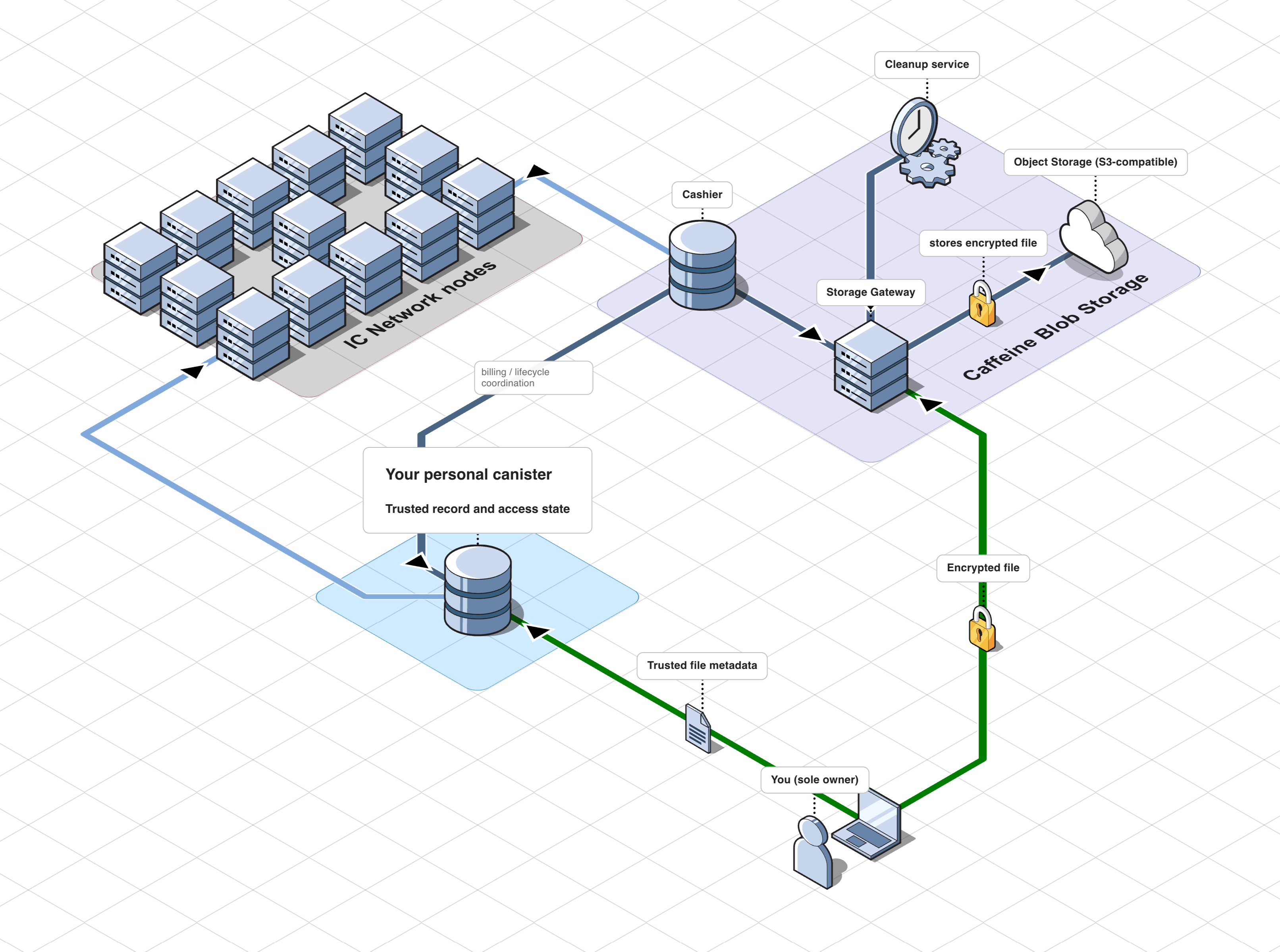
The Blob Storage path looks like this:
- your browser prepares and uploads the file;
- your personal canister keeps the trusted record and access state;
- Caffeine Blob Storage holds the encrypted bytes. Inside it, a gateway accepts uploads and returns files during download, a cashier pays for the storage, and a cleanup part keeps the stored data in sync with your canister.
How upload works
Prepare chunks in the browser
The browser splits the file into chunks and encrypts each chunk locally. Encrypted chunks are written to a temporary browser spool so the full encrypted file does not have to stay in memory.
Upload chunks to Blob gateway
The browser reads encrypted chunks from the spool and sends them to Blob gateway. The gateway stores the data in S3-compatible object storage.
Write the result into the canister
After successful upload, Rabbithole writes the result into the canister. The canister stores the trusted file record: size, hashes, metadata, and access state.
How download works
The browser does two things before opening the file:
- It gets the expected file fingerprint from your canister.
- It checks that the file downloaded from Blob Storage matches that fingerprint.
Only after that does decryption happen, if encryption was enabled for that file.
How billing and cleanup fit in
File bytes in Blob Storage have their own lifecycle. The canister remains the trusted system of record, but byte availability depends on Blob Storage funding and retention rules. Caffeine Blob Storage handles this for you:
- its gateway accepts uploads and returns files during download;
- its cashier keeps the storage funded;
- its cleanup part synchronizes deletion and retention events with your canister.
Why this model is cheaper
Blob Storage is cheaper because the file itself does not have to live inside canister memory. Your canister stores a much smaller amount of information: file records, access state, and verification data.
What this mode trusts
Trust is split across several parts:
- The Internet Computer keeps your canister state.
- The canister certifies trusted file metadata.
- The browser verifies downloaded bytes before opening them.
- Blob Storage is responsible for byte availability and retention.
Blob Storage and On-chain Storage use the same end-to-end encryption, but their availability models differ.